![Horizontal-Blue-2Color TM-2.png]](https://knowledge.formpiper.com/hs-fs/hubfs/Horizontal-Blue-2Color%20TM-2.png?height=40&name=Horizontal-Blue-2Color%20TM-2.png)
To connect your Shopwindow account with FormPiper, you'll need three things:
- Your Shopwindow URL - log into Shopwindow and copy the URL from your browser. It will look like:
https://yourbusiness.shopwindow.io - Your User ID and API Token -
- Log into Shopwindow
- Go to Settings > Setup > Developer Access
- Click on Generate API Token
- Follow the prompts until you are presented with your API Token. It will look like this:
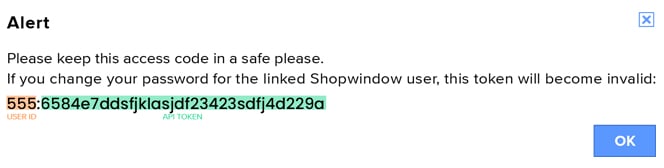
- Copy the full string (including both the user ID and API token)
Now that you have all the information, you can integrate your Shopwindow account with FormPiper.
Once connected, create a tag in Shopwindow called "New puppy owner". This ensures that when a FormPiper form is completed and marked as an accepted deal, a new customer record is created in Shopwindow with that tag. You can then set up a follow-up series for tagged customers.
Important: If you change your Shopwindow password, you'll need to generate a new API token and re-enter it in FormPiper.